
Chess Incremental Shop and Tickets
How Tickets replace Robux, where Exclusive Codes sit, and what not to buy first.
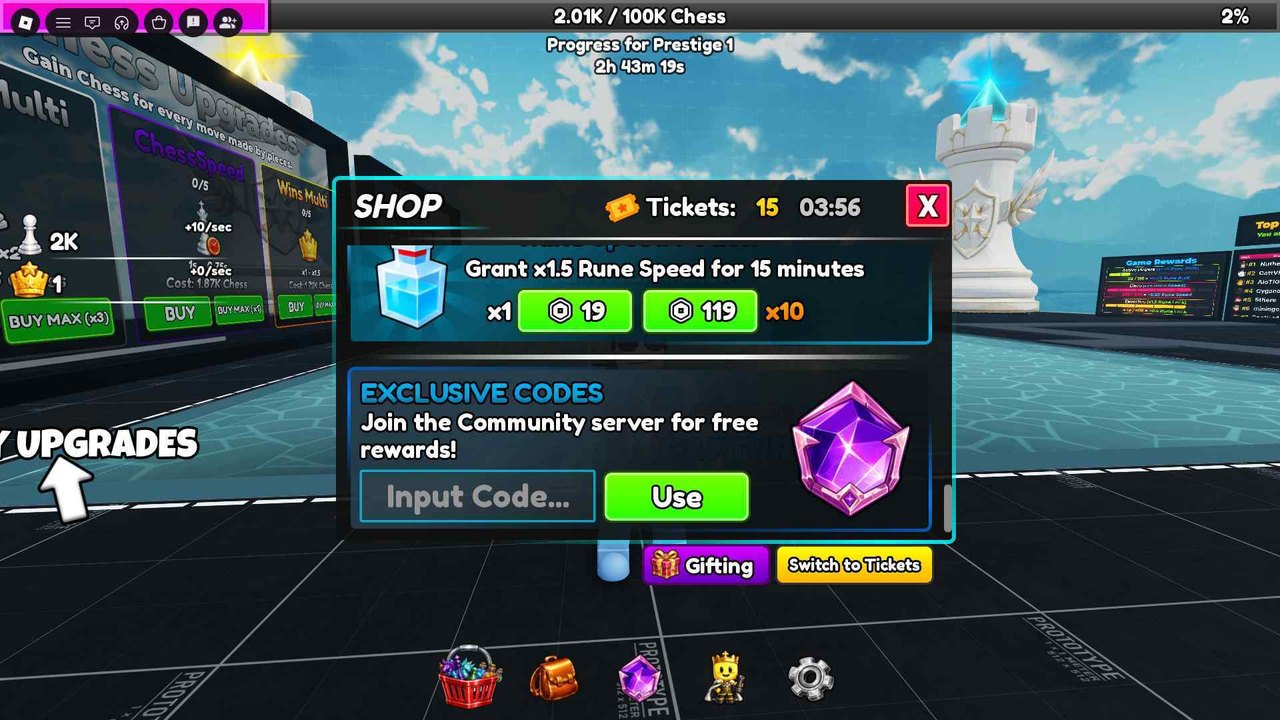
The Chess Incremental shop is the shopping-basket icon on the left of the bottom hotbar. It is not a chess clock. It is not a second prestige bar. It is the only place Tickets, Robux prices, Exclusive Codes, and timed rune potions share a window. This page is the spend map. Pair it with how to redeem for the click path and working codes for the live strings.
What the header shows
Open the basket. The SHOP title sits above a Ticket count and a small timer. Tickets are the free-to-play currency codes dump into your account. The timer is a separate drip the client can grant while you stay in the lobby. Do not confuse a ticking timer with a failed redeem. Codes jump the Ticket number immediately. The timer is background income.
A yellow Switch to Tickets button sits near Exclusive Codes, next to Gifting. The shop defaults to Robux. If you tap BUY on a potion row before switching, you spend Robux (or get a prompt) even though you already hold Tickets. That is the most expensive beginner mistake after skipping ChessSpeed.
Tickets versus Robux
Tickets exist so you can buy advertised shop rows without Robux. Sportskeeda’s September 2026 roundup says the same thing in one line: Tickets purchase game passes for free. In the live client that means the rows you can flip onto Tickets: extra Rune Luck, Rune Speed, and Rune Bulk potions, plus any pass the shop currently prices in both currencies.
Robux still exists for players who want a stack now. You do not need it for Prestige 1. Codes on the current list include 100KVisits for 100 Tickets. That pile is enough to sample potions without opening the Robux catalog. If a row refuses Tickets after you press Switch to Tickets, it is a Robux-only cosmetic or a pass 3Face has not dual-priced. Walk away. ChessSpeed is bought with Chess on the left wall, not here.
Exclusive Codes inside the shop
Scroll past the first potion cards. Exclusive Codes is a dedicated block with Input Code, a green Use button, and a line that tells you to join the community server for free rewards. That server is the 3Face Discord on official links. There is no second code box in settings. There is no group-wall redeem. If Use does nothing, you are either on the testing place, already redeemed, or typing an expired string such as REBALANCE.
Gifting is not a code channel. It sends shop items to another player. Do not paste Frog into Gifting.
What to buy with Tickets
Buy potions you will drink during a real rune session, not vanity stacks you will forget in the backpack. The shop example Speed row is Grant x1.5 Rune Speed for 15 minutes, with x1 and x10 prices. Luck and Bulk sit in the same family. The potions guide is the drink schedule. This page is only the wallet.
Do not empty the Ticket counter on a single type. A prestige push wants Luck and Speed together more than ten Speed drinks and zero Luck. Keep a reserve for the next CCU string in case 3Face prices a new pass in Tickets after a shutdown. Check updates if the shop looks different than this morning’s screenshot.
What not to buy
Do not buy Robux potions because the Exclusive Codes box looks empty. Redeem first. Do not buy a pass because a leaderboard name wears a crown. Crowns are Wins Multi on the left wall, not a shop flex. Do not buy from the 3Face testing place. Prices and codes there are not the live economy.
Chess, Wins, and prestige progress do not live in this window. If the 100K Chess bar is your problem, leave the shop and open upgrades. If runes feel slow, you have a potion-timing problem, not a missing game pass.
Session order
- Redeem every live string from working codes.
- Press Switch to Tickets.
- Buy at most the potions you will sit with for fifteen minutes.
- Close the shop. Buy ChessSpeed with Chess.
- Open the gem only when those potions are about to be used, as runes and ranks describes.
The prestige checklist has a shop-toggle box for the last stretch to 100K. Use it. Tickets in the header do not prestige you. They only buy the window that makes the gem less sad.
Mobile and PC notes
On a phone, the basket is easy to miss under Roblox chat. Rotate to landscape, close chat, then tap the leftmost hotbar icon. On PC, the shop is a window over the plaza; the auto-board keeps moving behind it. You can redeem while pieces capture. You cannot redeem from Discord chat inside Roblox. Copy the string, focus Input Code, paste, Use.
If the Ticket number does not move after a success, scroll the shop header. Mobile UI sometimes clips the counter. Reopen the basket before assuming the code died.
After a patch
3Face can dual-price a new row or move Exclusive Codes. The August rebalance window already proved numbers can change without a store-page essay. If Switch to Tickets disappears, stop spending and read updates. If a new pass appears with a Robux-only tag, ignore it until a Ticket price exists or you actually want to pay.
Tickets already granted stay on the account when a code expires. REBALANCE dying on 1 September 2026 did not claw back old payouts. It only blocked new Use presses. Spend what you hold.
The shop is a wallet with a code box taped to the bottom. Treat it that way. The board still prints Chess whether the window is open or not.
Frequently Asked Questions
Quick answers for Chess Incremental on Roblox.
Do I need Robux for Chess Incremental?
No. Tickets from working codes buy shop rows if you press Switch to Tickets.
Where is the shop?
Bottom hotbar, leftmost basket icon. Full clicks are on how to redeem.
What should I buy first with Tickets?
Potions you will drink in a 15-minute rune window. See potions.
Does the Ticket timer mean a code failed?
No. The timer is a separate lobby drip. Codes jump the Ticket count immediately.
Can I gift codes?
No. Gifting sends shop items. Codes are redeemed per account in Exclusive Codes.