
How to Redeem Chess Incremental Codes
Shopping basket, Exclusive Codes, Use, then Switch to Tickets.
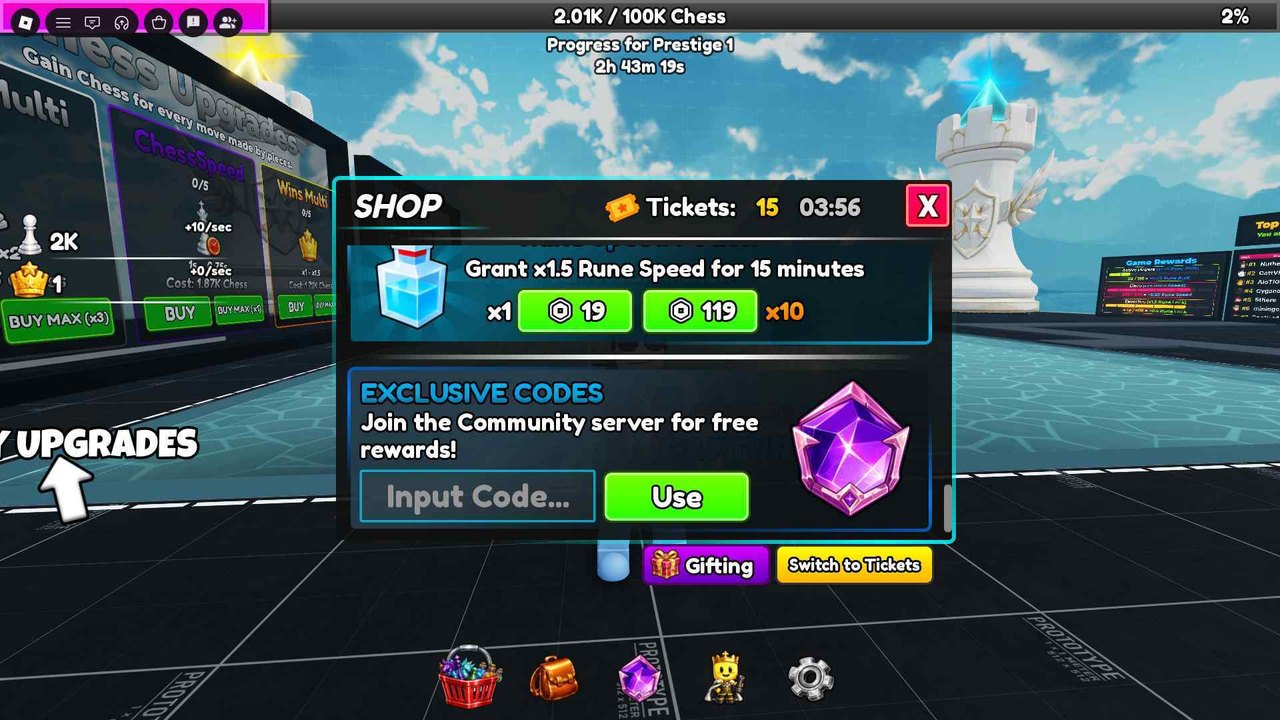
Every Chess Incremental code goes through the same shop panel. There is no separate Codes button on the left HUD and no Discord bot that injects rewards. If you can see the auto-board, you can open Exclusive Codes.
This page is the click-by-click path. Pair it with the live list on working codes and the graveyard on expired codes. New accounts should redeem before buying ChessSpeed so Tickets are sitting in the shop when you decide what to purchase.
Open the shop
- Launch Chess Incremental from Roblox.
- Wait until the lobby loads: upgrade boards on the left, auto-board in the center, prestige bar at the top.
- Look at the bottom hotbar. The shopping basket is the leftmost icon.
- Tap the basket. The SHOP window opens with a Ticket count in the header.
If the basket is missing, you are in a loading state or a different place (the 3Face testing place is not the live experience). Rejoin the public Chess Incremental place linked from official links.
Find Exclusive Codes
Scroll inside the shop. Potion rows appear first. One example row sells Rune Speed: Grant x1.5 Rune Speed for 15 minutes, with a Robux price for x1 and x10. Below that block is Exclusive Codes. The subtitle tells you to join the community server for free rewards. That server is the 3Face Discord listed on official links.
The input is labelled Input Code. The green button is Use. A purple rune gem sits beside the field as decoration. It is not a second redeem button.
Type and confirm
- Copy a code from working codes.
- Paste it into Input Code. Codes are not case-sensitive, but spaces and extra punctuation fail.
- Press Use.
- Watch Tickets in the shop header and the potion counts on your bar.
- Repeat for every remaining active code. Each string is one-time per account.
A success usually increments Tickets immediately. 100KVisits should jump the counter by 100. If the counter does not move, the code is expired, already redeemed, or mistyped.
Switch to Tickets
The shop defaults to Robux prices. A yellow Switch to Tickets button sits under Exclusive Codes next to Gifting. Press it before you buy. Tickets are the reason codes exist: they let you take potion packs and advertised passes without Robux. Gifting is for sending shop items to another player; it does not redeem codes.
Do not blow every Ticket on speed potions the second they land. The prestige checklist is a better spend plan if you are close to 100K Chess. The upgrade guide still wants ChessSpeed bought with Chess, not Tickets.
Failures and fixes
Invalid or expired. Move the string to expired codes in your notes. REBALANCE is the current example. Do not keep retrying.
Already redeemed. The box will not pay twice. This is account-wide, not server-wide.
Shop will not open. Rejoin. Mobile sometimes needs a second tap on the basket. Make sure you are not covering the hotbar with the Roblox chat.
Use does nothing. Focus the text field, delete hidden spaces, and press Use again. Copy from this wiki instead of a screenshot that wrapped a line break into the string.
No Tickets after a success toast. Scroll the shop header. The Ticket number sits beside a small Ticket icon and a timer. If the timer is counting, the game is also granting Tickets on a clock; that is separate from codes.
After a full redeem pass
Like and Favorite the experience if you have not. Those flags grant Rune Speed and Rune Luck independently of potions. Details are on group perks. Then open runes and ranks so you know whether to drink Luck, Speed, or Bulk first. If you are still in the first hour, return to getting started and put Chess into ChessSpeed while the potions wait.
Keep the code tracker bookmarked. Milestone codes appear faster than patch notes. Typing random CCU numbers wastes time; waiting for a listed string does not.
Frequently Asked Questions
Quick answers for Chess Incremental on Roblox.
Where is the code box in Chess Incremental?
Shopping basket on the bottom hotbar, then scroll to Exclusive Codes. Type the string and press Use.
Do I need to join the 3Face group to redeem?
No. Codes redeem without a group join. Joining still helps for community news and the Discord invite on official links.
Why did Use fail?
The code is expired, already redeemed, or has extra spaces. Compare against working codes and expired codes.
How do I spend Tickets?
Press Switch to Tickets in the shop, then buy potions or passes. Tickets are an alternative to Robux, not a Chess currency.